Editor’s note, April 2026: This article was first published in May 2023. This update reflects current Microsoft Rewards mechanics from an Australian user perspective, including changes to Xbox Rewards, earning limits, redemption options and Give with Bing.
Microsoft is one of the most well-known companies in the world. Known for its innovative products and services, Microsoft continuously shapes the digital landscape with its software, cloud, gaming and AI offerings. Microsoft Rewards evolved from Bing Rewards and is now available across multiple markets, including Australia. While the exact earning limits, reward options and point values vary by country, the program remains centred on a simple idea: rewarding members for engaging with Microsoft products and services.
The Microsoft Rewards program offers users a valuable opportunity to earn points by completing simple tasks and subsequently redeeming them for a diverse range of appealing rewards. Nonetheless, the program does possess certain limitations.
How to join Microsoft Rewards
To become a member of Microsoft Rewards, a Microsoft account is necessary. Upon creation, users can then go to the Microsoft Rewards program and start earning points immediately.
Upon registration, new members gain immediate access to their personalised Rewards dashboard.
How to earn Microsoft Rewards
Members can redeem their points by visiting the Microsoft Rewards dashboard and selecting an eligible reward. Redeemable rewards can include:
- Gift cards, including Microsoft and Xbox gift cards, as well as selected third-party gift cards
- Donations to selected nonprofits
- Xbox-related rewards
- Microsoft Store rewards
- Sweepstakes entries for a chance to win larger prizes and experiences
The number of points required to redeem a reward varies depending on the reward, market and member status. This is part of the program design. Microsoft Rewards encourages ongoing engagement with the Microsoft ecosystem, while still giving members some choice in how they redeem their points.
How to redeem Microsoft Rewards
Members can redeem their points by visiting the Rewards page on the Microsoft Rewards website and select the eligible reward they wish to redeem. Reemable rewards include:
- Gift cards (including Microsoft & Xbox Gift cards, as well as Gift cards for other places from everything from Roblox to Coles)
- Donations to charity (such as a donation to Lifeline Australia, Mission Australia and the Special Olympics)
- Xbox games and subscriptions
- Microsoft Store purchases
- Sweepstakes entries for a chance to win bigger prizes and unique experiences
The number of points required to redeem a reward varies depending on the reward. For example, a $10 gift card may require 10,000 points, while a free month of Xbox Game Pass may require 2,000 points. It should be emphasised that the point system for redeeming rewards in the Microsoft Rewards program is designed to incentivise and promote continued engagement with Microsoft ecosystem products. For example, a $10 gift card to the Microsoft Store may require fewer points than a $10 gift card to Roblox.
Give with Bing
Microsoft Rewards also includes Give with Bing, allowing members to use their points to support selected nonprofits. In Australia, Microsoft currently describes this as giving members the ability to donate points to over one million nonprofits. This adds a cause-led layer to the program while continuing to encourage members to use Bing as their preferred search engine.
Additional program features
Microsoft Rewards incorporates tiers into the program, labelled as Levels. In Australia, the program currently includes Level 1, Level 2 and Level 2 + Xbox Game Pass Ultimate.
All members begin at Level 1. Members can move to Level 2 by earning at least 500 points in a month. Level 2 members can earn more points through eligible activities, including higher Bing search limits and higher earn rates on eligible Microsoft Store purchases.
Microsoft also links additional earning potential to Xbox Game Pass Ultimate. This has replaced the older Xbox Live Gold reference used in the original version of this article. Members should check their own Rewards dashboard for the most current earning limits and benefits, as Microsoft states that ways to earn and redeem vary by market.
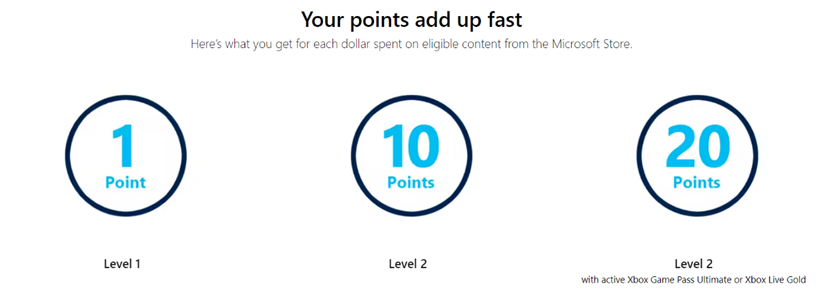
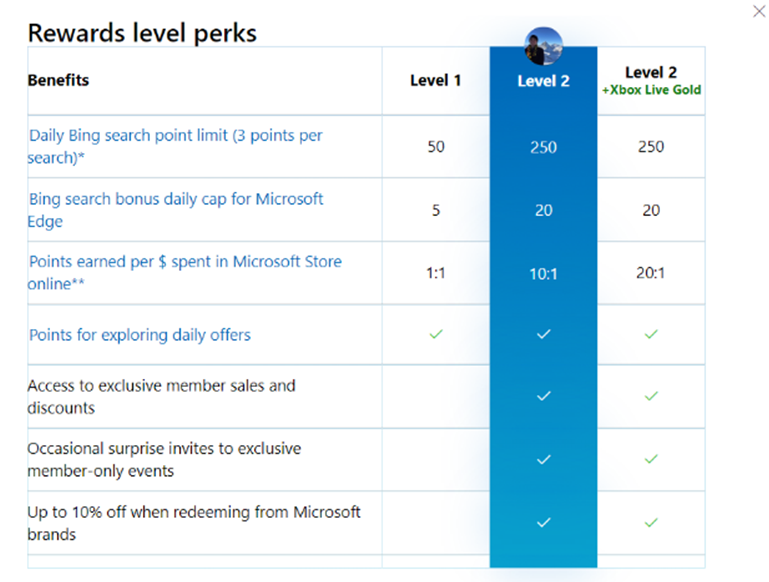
All members begin at Level 1. Members must earn at least 500 points to advance to Level 2. To retain Level 2, members must earn at least 500 points each month, otherwise they will be demoted to Level 1.
For full perks of each level, see below.
Digital punch cards and quests
Microsoft Rewards continues to use dashboard activities, quests and Xbox-related challenges as ways for members to earn additional points. These activities often have a time limit and may require members to complete a specific action, such as searching, playing an eligible game, completing a quiz or claiming points through the Rewards dashboard.
The Xbox side of the program has changed since this article was first published. Microsoft now refers to Rewards activity across console, PC and mobile, with some quests linked to Xbox Game Pass tiers. This keeps the program connected to gameplay, but the exact activities and point values change regularly.
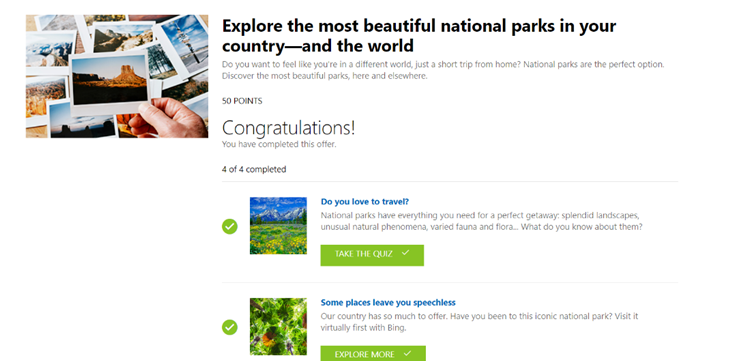
Non-transactional punch card
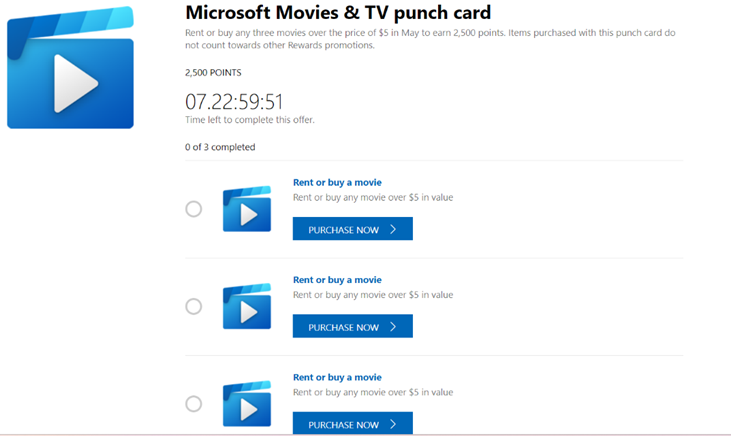
Transactional punch card
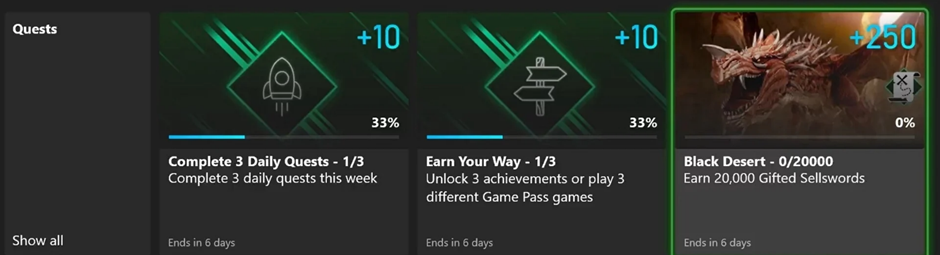
Exemplar Xbox Quests
Gamification
In additional to levels (tiers), punch cards, and quests, Microsoft Rewards utilises several additional gamification elements to make the program more engaging and rewarding for members. These elements include:
- Activities/challenges: (As stated previously)
- Badges: Members can earn badges for completing certain tasks, such as searching with Bing for a certain number of days in a row.
- Achievements: Members can earn achievements for completing certain tasks, such as playing a certain number of games on Xbox.
- Progress tracking: Members can track their progress towards earning rewards.
In addition, all these gamification elements incorporate visual elements, such as icons and creative text that represent the activity, progress, achievement, and more. Whilst these can be gimmicky, they accelerate the effectiveness of such gamification elements.
These gamification elements make Microsoft Rewards more than just a way to earn points, and instead making it a fun and engaging experience that encourages members to continue using Microsoft products and services.
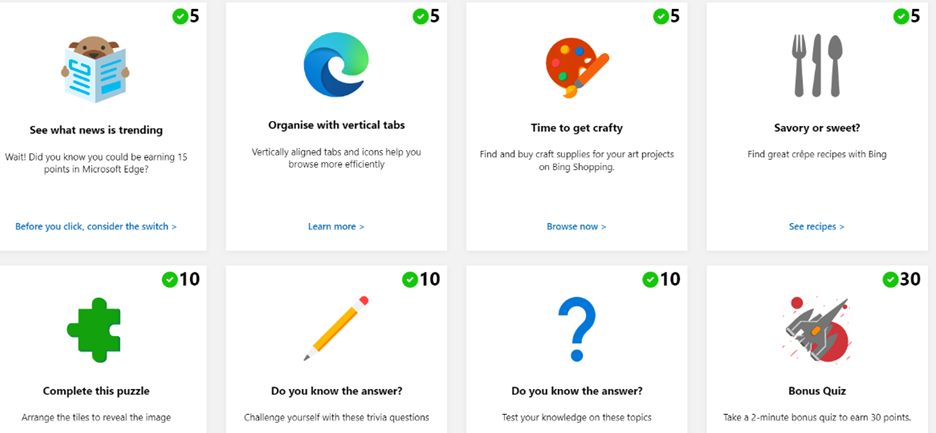
Gamification – Activities/Challenges – represented by visual icons and creative and engaging text
2026 update: Microsoft Rewards is still active, but the mechanics have shifted
Since this article was first published in May 2023, Microsoft Rewards has remained active in Australia, but some of the mechanics have changed.
The core program is still familiar. Members can earn points by searching with Bing, completing Rewards dashboard activities, shopping through Microsoft and engaging with Xbox. Points can still be redeemed for rewards such as gift cards, sweepstakes entries and nonprofit donations.
The biggest change is in the Xbox side of the program. The original article referred to Xbox Live Gold, but Microsoft’s current Rewards structure now links additional earning opportunities to Xbox Game Pass Ultimate. Microsoft also now talks about earning through console, PC and mobile, with daily, weekly and monthly quests available through the Rewards experience.
Microsoft Rewards also remains highly market-specific. Australian members do not necessarily see the same earning limits, redemption options or point values as members in the United States. This is important because Microsoft itself notes that ways to earn and redeem vary by market.
Overall, the original analysis still holds. Microsoft Rewards remains a smart ecosystem loyalty play, using points, levels, quests and gamification to encourage repeat engagement with Bing, Microsoft Store and Xbox. However, members need to pay attention to the current dashboard, because the value of the program depends heavily on where they live, which Microsoft products they use and how often they engage.
Microsoft Rewards: Worth the Bing?
After examining the Microsoft Rewards program in detail, the program offers a valuable proposition to its members. The program is free to join, and there are a variety of ways to earn points. The real strength, however, lies in its incorporation of gamification elements, which make it more engaging and encourage continued participation. Additionally, the tiered structure provides members with incentives to actively earn more points and maintain their status, whilst creating sense of exclusivity.
It is important to note that Microsoft Rewards does have some limitations. For example, the program’s value heavily relies on the individual’s engagement with Microsoft products and services. If a user is not an avid user of Microsoft Edge, Bing, the Microsoft Store, or Xbox, they may find it more challenging to accumulate points at a faster rate. However, this structure is intentional and serves to encourage and reward loyalty to the Microsoft ecosystem.
Furthermore, reward availability, mix and cost has been intentionally designed in favour of the business. Microsoft’s loyalty program strategy aims to foster long-term behavioural change and encourage users to engage more extensively with the Microsoft ecosystem of products and services through the loyalty program. This approach involves deferred rewards in the form of points and the weighting of reward costs to incentivise the redemption of Microsoft rewards. Although opting for external options like gift cards from other retailers may incur higher costs, Microsoft Rewards program provides these alternatives to ensure user choice while highlighting the advantages of utilising the Microsoft ecosystem.
How could it enhance the program further?
While Microsoft Rewards successfully utilises everyday activities to offer rewards and engage members, there is always room for improvement in any program. It is important to consider how Microsoft could enhance its loyalty program strategy further. Microsoft should build upon the essential loyalty principles and introduce additional features to their program.
Additional features they should consider include:
- Exclusive partnerships with popular brands: Collaborating with well-known brands and companies can help Microsoft add prestige and desirability to the rewards program.
- Social and community features: Incorporating social elements within the program, such as leaderboards, can foster a sense of community and healthy competition among members. This not only increases engagement but also promotes loyalty and encourages members to advocate for the program to their peers.
- Surprise and delight rewards: Introducing occasional surprise rewards or bonus points for specific activities or milestones can create excitement and keep members motivated. These unexpected rewards can serve as pleasant surprises and reinforce the positive association with the program.
- Tiered Benefits: Expanding the levels/tiers within the rewards program to provide additional perks and privileges for members who consistently engage and earn points. This could include access to exclusive events and early product previews.
By implementing these enhancements, Microsoft Rewards can elevate the overall experience, deepen member engagement, and strengthen the value proposition of the program, ultimately driving greater loyalty and satisfaction among its users.
The ultimate question though – Would I abandon my personal favourite search engine Google, or my favourite browser, Chrome, in favour of Bing and Microsoft Edge for the sake of earning a few Rewards points? Yeah… I don’t think so.